Your build
Your assistant
↑ Pick your role above and this changes to match your work.
An example of the kind of assistant you build. Yours uses the sample learning data we provide.
Microsoft Official Courseware, a guided sandbox, and an Evidence Pack you can show on Monday. No coding.
$249 incl. GST · 2–4 hours · 30 days access · 7-day refund
Make it relevant
Pick your role and the example below rebuilds around the kind of work you actually do.
Your selection updates the example below
Secure checkout. Access details arrive by email within minutes. See what's included ↓
On your phone? This build needs about an hour at a computer. We'll email you the link so it's ready when you are.
Microsoft Training Services Partner · 500,000+ learners supported · INBIOT PTY LTD, Australia
Your build
↑ Pick your role above and this changes to match your work.
An example of the kind of assistant you build. Yours uses the sample learning data we provide.
The fair question
Keep using it — it's good. This is a different thing, and the difference is the point.
A general AI chat
Building an assistant yourself
What you actually do
Self-paced, so you can split it across two evenings if that suits you better.

Work through the Microsoft Official Courseware pathway on Microsoft Learn.
≈ 60 minWe provision an INBIOT-managed environment. Nothing to install, nothing to configure.
≈ 10 minFollow the guided build for your role and your chosen way in, using the sample data we provide.
≈ 90 minAsk it real questions, fix what's wrong, then generate your AI Agent Evidence Pack.
≈ 30 minChoose how you build it
Have a look, but this isn't a decision you make at checkout — you choose inside the course, and you can change your mind.
Point, click, done. You describe what you want the assistant to do and it gets built around your answers. Nothing to set up.
Shape how it answers, connect the supplied reference material, and set the rules it follows. Still no coding.
Full control over the model and the setup. More settings to work through — good if you're already comfortable in cloud portals.
You choose inside the course, not at checkout — and you can change paths later. All three finish with the same Evidence Pack.
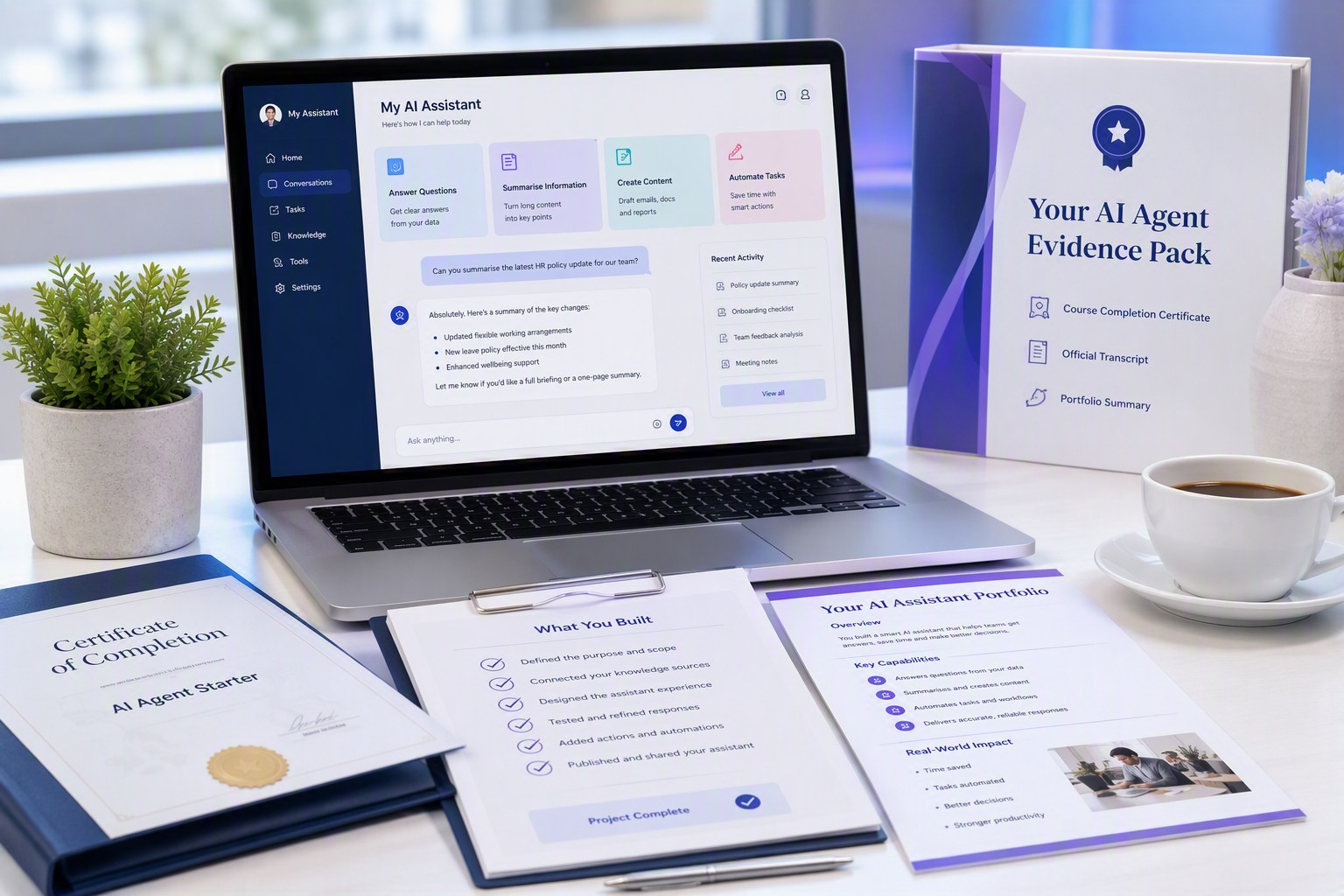
What you keep
Your AI Agent Evidence Pack
Applied work you can show a manager, a client or an interviewer. Not an assignment — the actual record of what you built.
Straight answers
We'd rather you know before you pay than find out after.
Using this for CPD
This course is not claimed or represented as CPD-accredited. We make no guarantee that it meets the requirements of any professional body or regulator. Participants are solely responsible for determining whether the course is eligible for CPD with their association and for maintaining their own evidence of completion.
INBIOT PTY LTD · ABN 79 696 528 506
Who you're buying from
INBIOT has delivered Microsoft-focused training to universities, government bodies, and enterprises for years, with deep experience helping organisations adopt and apply Microsoft technologies in real-world environments.
We are a Microsoft Training Services Partner, a women-owned and women-led organisation, and an IIM Bangalore-incubated company. Our delivery teams operate across three countries, providing responsive support across time zones. The learning environment behind this course is built and managed by INBIOT, giving us direct control over the training infrastructure, faster setup, and a more reliable hands-on experience for every learner.
Enrol
No subscription, no upsell required to finish, no surprises at checkout.
Professional
$249
incl. GST · one-off
Secure Stripe checkout → access by email → start in your browser, nothing to install.
7-day refund if you haven't completed the build or generated your Evidence Pack.
Team
$999
incl. GST · up to 5 people
$200 each
Supplied by INBIOT PTY LTD, ABN 79 696 528 506 — a women-owned and women-led company, incubated at IIM Bangalore.
Within 7 days of purchase, provided you haven't completed the guided build or generated your Evidence Pack. Email us from your enrolment address. This sits on top of your rights under the Australian Consumer Law, which we can't and don't limit.
Studying full time? Check the student rate — a current .edu.au email address is required.
Questions
No. Two of the three ways in involve no coding at all — you build by describing what you want and clicking through the options. The third gives you more control and more settings, and suits people already comfortable in cloud portals. You pick, and you can change your mind inside the course.
If you've never built anything like this, start simple — it's the fastest route to something working. Choose the middle option if you want more control over how it answers and how it uses the supplied reference material. The third is for people who want full control and don't mind more settings.
All three finish with a working assistant and the same Evidence Pack, and you can switch inside the course.
Microsoft tools, in your browser — nothing to install and no licence to buy. Depending on which of the three you choose, you'll work in Microsoft Copilot Agent Builder, Microsoft Copilot Studio or Azure AI Foundry, inside a sandbox we set up and pay for.
No. You finish with a Microsoft course completion certificate for the Microsoft learning content, plus an INBIOT completion certificate. A Microsoft Certification is awarded only by Microsoft after you pass the applicable exam. We'll show you that pathway if you want it.
Many professional bodies accept structured technical training toward CPD, and this runs 2–4 hours. Whether it's recognised, and for how many hours, is your body's decision — check with them before enrolling if that's your main reason.
No. You build using the sample learning data we provide. Please don't upload confidential, client, employer, medical, legal, financial or regulated information into the sandbox.
No — it's a learning prototype in a managed sandbox. It shows you can build one and teaches you how. If you want a live version running in your business, we can scope that separately.
You get 30 days of course and sandbox access from enrolment. The Evidence Pack you generate is yours to keep permanently.
You're enrolled automatically and your access details arrive by email, usually within a few minutes. If nothing arrives, email us from your enrolment address and we'll sort it out.
You buy five seats and start immediately as one of them. We email you for the other four addresses — or you can enter them straight after checkout — and we set those people up within one business day.
Yes, for full-time students with a current .edu.au email address. It's the same programme and the same Evidence Pack. Use the student rate link under the pricing to see it.
Yes, within 7 days of purchase, provided you haven't completed the guided sandbox build or generated your AI Agent Evidence Pack. Once you have, the programme is treated as substantially delivered. Your rights under the Australian Consumer Law are unaffected.
Two to four hours, no coding, Microsoft Official Courseware, and proof you can show on Monday.
7-day conditional refund · secure Stripe checkout · access within minutes